
Production-ready full-stack multi-agent orchestration using GitHub Copilot with custom agents, prompts, skills, reusable workflows, and human-in-the-loop review.
A single Copilot chat session trying to "build a fullstack feature" tends to lose track of requirements halfway through, mix frontend and backend code in one messy context, skip tests (or write tests that were never actually run), and ship without any real review pass.
Multi-agent orchestration fixes this by splitting the work into small, single-purpose agents, each with its own restricted toolset and its own clean context window, coordinated by one orchestrator agent that never writes code itself — it only plans the sequence and hands work off.
This is the same idea as a real engineering team: a PM writes the plan, an engineer researches unknowns, a frontend dev builds the UI, a backend dev builds the API, QA writes tests, a senior engineer reviews, and someone writes the release notes. Each role stays in its lane.
✨ Features
- 🤖 Multi-Agent orchestration
- 🧠 Planning and Research agents
- ⚛️ React + Tailwind frontend generation
- ☕ Spring Boot backend generation
- ✅ Automated testing (Jest/RTL + JUnit5/Mockito)
- 🔍 Review quality gate with a loop-back to fix
- 📄 Final delivery report (one human-facing summary)
- 🔁 Human-in-the-loop workflow
- 🛠️ VS Code & GitHub Copilot compatible
Table of Contents
- The problem this solves
- The agents (roles)
- High-level flow diagram
- Sequence diagram (message-by-message)
- Anatomy of an agent file
- How delegation actually happens
- How to use it
- Extending or customizing
- Design principles worth remembering
- Known limitations
- Contributing
1. The problem this solves
A single Copilot chat session trying to "build a fullstack feature" tends to:
- lose track of requirements halfway through,
- mix frontend and backend code in one messy context,
- skip tests, or write tests that were never actually run,
- ship without any real review pass.
Multi-agent orchestration fixes this by splitting the work into small, single-purpose agents, each with its own restricted toolset and its own clean context window, coordinated by one orchestrator agent that never writes code itself — it only plans the sequence and hands work off.
This is the same idea as a real engineering team: a PM writes the plan, an engineer researches unknowns, a frontend dev builds the UI, a backend dev builds the API, QA writes tests, a senior engineer reviews, and someone writes the release notes. Each role stays in its lane.
2. The agents (roles)
| Agent | File | Role | Can edit code? |
|---|---|---|---|
orchestration |
agents/orchestration.agent.md |
Entry point. Breaks down the request and delegates each stage in order. | No |
plan |
agents/plan.agent.md |
Turns the request into requirements, architecture, task list, open questions. | No |
researcher |
agents/researcher.agent.md |
Resolves open questions, checks existing code conventions, verifies library/API usage. | No (read-only) |
frontend-code-creator |
agents/frontend-code-creator.agent.md |
Implements React + Tailwind CSS UI code. | Yes — frontend/** only |
backend-code-creator |
agents/backend-code-creator.agent.md |
Implements Java 17 + Spring Boot API code. | Yes — backend/** only |
testing |
agents/testing.agent.md |
Writes and runs Jest/RTL and JUnit5/Mockito tests. | Yes — test files only |
review |
agents/review.agent.md |
Checks everything against the plan, contract, quality, and test results. Approves or sends back fixes. | No |
final-report |
agents/final-report.agent.md |
Writes the one human-facing summary of the whole run. | No |
Supporting (non-agent) files:
| File | Purpose |
|---|---|
.github/copilot-instructions.md |
Always-on repo context: tech stack, folder layout, ground rules. Applied to every Copilot request in this repo automatically. |
.github/instructions/*.instructions.md |
Auto-applied by file glob (applyTo:) — e.g. React rules only apply when a frontend/** file is open/edited. |
.github/prompts/*.prompt.md |
Reusable, parameterized slash-commands (/fullstack-feature) that kick off a run with a consistent template. |
.github/skills/*.skill.md |
Plain reference docs (conventions, pitfalls, patterns) linked from agent bodies — a manual "knowledge pack," not a special auto-loaded Copilot feature. |
3. High-level flow diagram
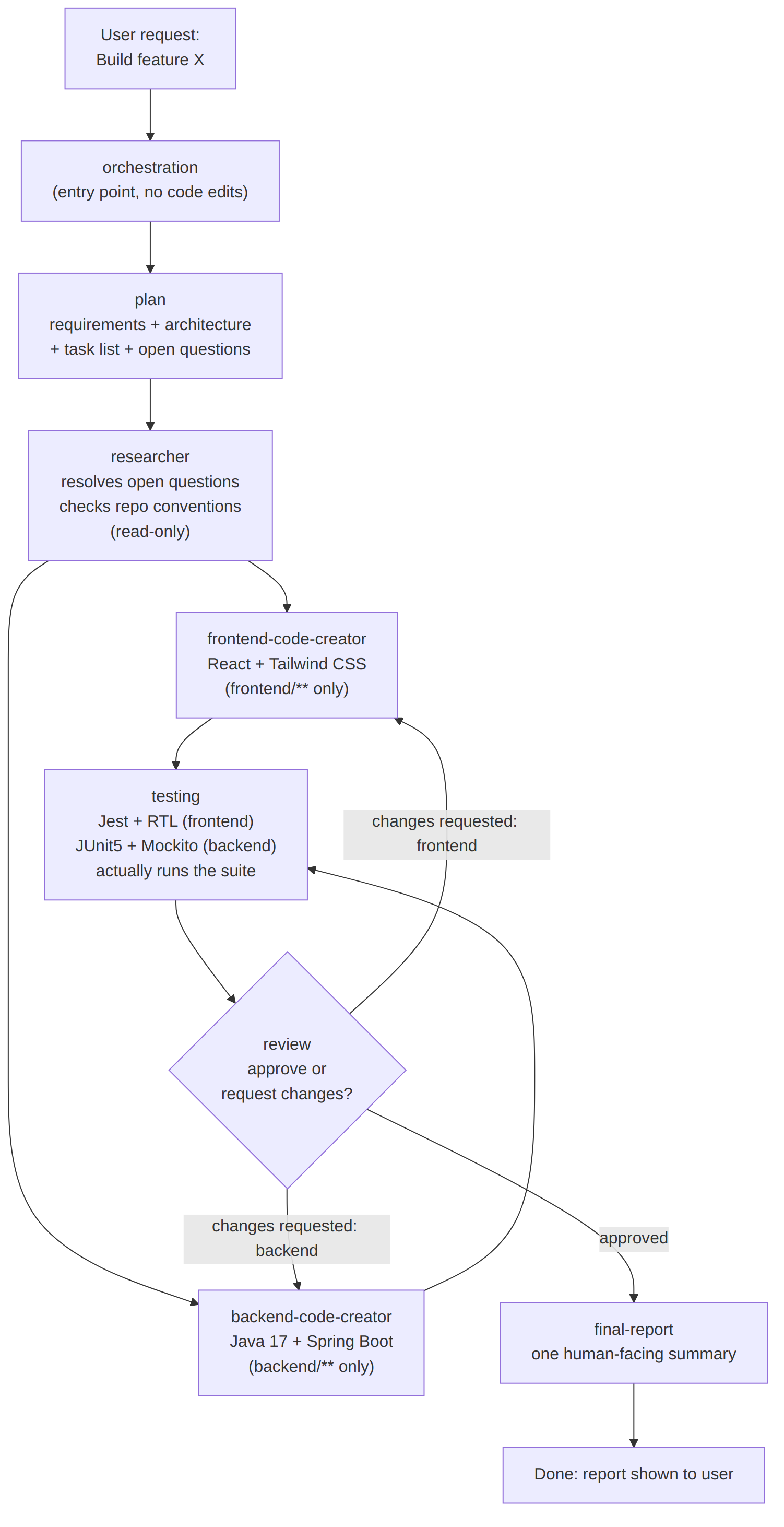
Key points the diagram encodes:
researcherfans out to both creator agents because frontend and backend work can proceed independently once open questions are resolved.reviewis a gate with a loop back — it's the only agent allowed to send work back to a creator agent, and it always says exactly what to fix.final-reportonly runs once, after approval — it's terminal.
4. Sequence diagram (message-by-message)
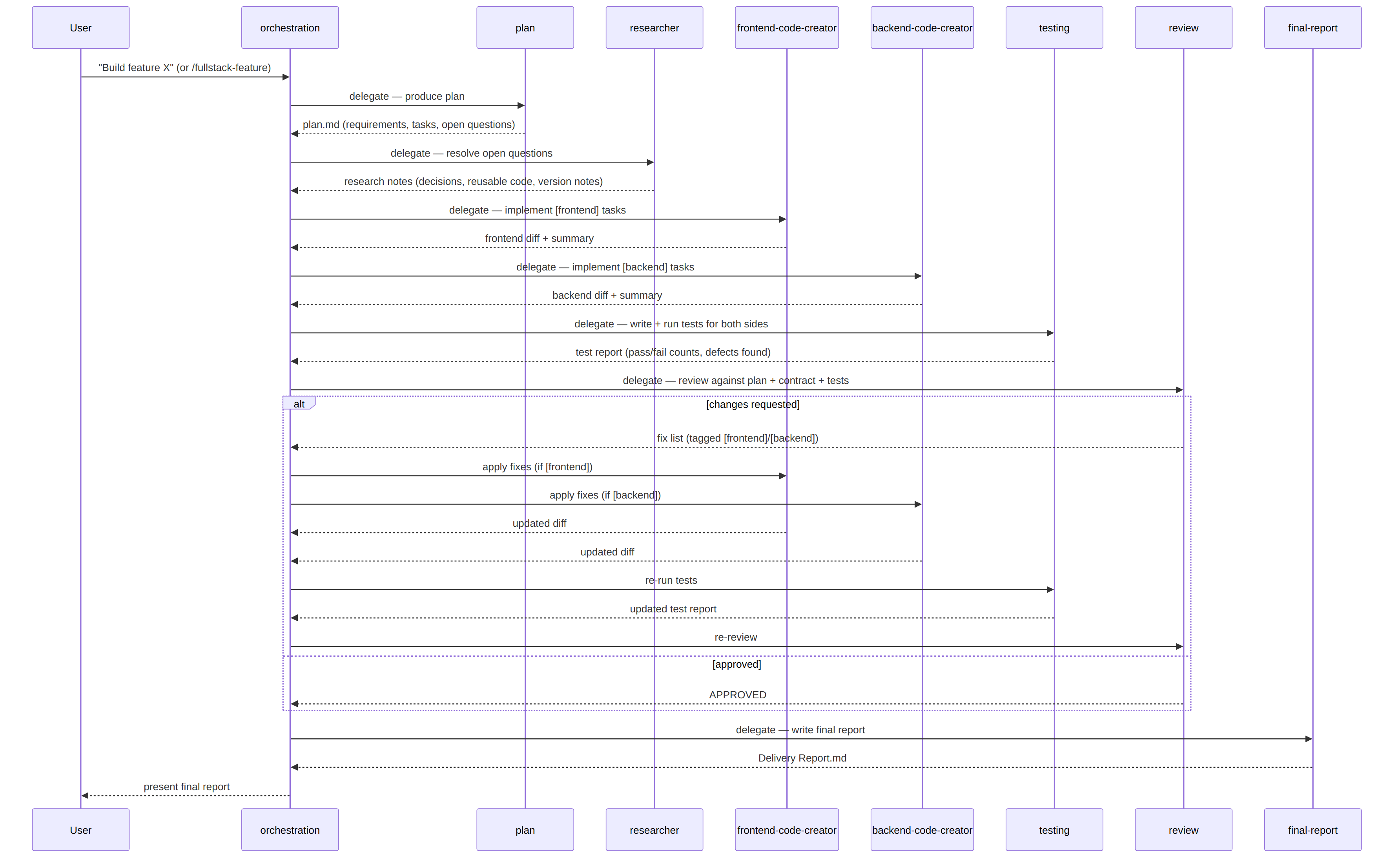
The loop can repeat as many times as needed — the
orchestrator's job is just to keep routing between review and the right
creator agent until review says APPROVED.
5. Anatomy of an agent file
Every file in .github/agents/*.agent.md has two parts:
---
name: frontend-code-creator          # unique id, used for @mentions and handoffs
description: ...                    # used by Copilot to auto-select this agent
tools: ['codebase', 'edit/editFiles', 'terminal', 'search']
model: ['Claude Sonnet 5', 'GPT-5.2']  # tried in order, first available wins
user-invocable: true                 # can a human @mention it directly?
handoffs:
  - label: Send to Testing
    agent: testing
    prompt: Write and run tests for the frontend code above.
    send: false                      # false = show a button, don't auto-send
---

# Frontend Code Creator Agent
... the actual instructions/persona/rules for this agent ...
Frontmatter fields explained:
| Field | Meaning |
|---|---|
name |
Unique identifier. Also becomes the filename convention (name.agent.md). |
description |
Copilot uses this to decide "does this request match this agent?" during auto-delegation. Be specific — vague descriptions cause bad routing. |
tools |
Restricts what the agent can do. A review agent has no edit/editFiles because it should never modify code itself. |
model |
A preference list — lets you pin a stronger model for judgment-heavy stages (plan, review) and a faster one for mechanical stages. |
user-invocable |
Whether a human can type @agent-name directly, vs. only being reachable as a sub-agent. |
disable-model-invocation |
If true, prevents Copilot from auto-picking this agent as a sub-agent — forces explicit invocation only. |
handoffs |
VS Code-specific: after this agent finishes, show buttons to jump to the next agent with a pre-filled prompt. send: false means the human clicks to confirm before it runs (keeps a human in the loop between stages). |
The Markdown body below the frontmatter is the system prompt for that agent — it's prepended to whatever the user/orchestrator asks it to do.
6. How delegation actually happens (two mechanisms)
There are two different runtimes this same file structure works with, and they delegate slightly differently:
-
VS Code Copilot Chat (interactive, human-in-the-loop) The
orchestrationagent's response ends with a handoff button (defined in itshandoffs:frontmatter). You click it, it switches the active agent and sends a pre-filled prompt. This is explicit and visible — good for learning the flow or when you want to review each stage's output before continuing. -
Copilot CLI / Copilot coding agent (autonomous) Given a single instruction, the runtime reads every agent's
descriptionand automatically decides which sub-agent to invoke for each piece of work, running them as isolated sub-agent calls and streamingsubagent.started/subagent.completedevents back. You don't click anything — the orchestrator's instructions (its Markdown body telling it the fixed pipeline order) are what keep the sequence disciplined, since automatic delegation alone doesn't guarantee ordering.
This is why the orchestration agent's body explicitly spells out the
pipeline order and rules — that's the mechanism that makes autonomous
delegation reliable, not just the description fields.
7. How to use it
Step 0 — Install
Copy the whole .github/ folder into your repository root (merge if you
already have one). Commit and push.
Option A — Slash command (recommended starting point)
In Copilot Chat:
/fullstack-feature
You'll be prompted for featureRequest and optional constraints (see
.github/prompts/fullstack-feature.prompt.md). This auto-invokes
orchestration.
Option B — Direct @mention
@orchestration Build a "user profile" page: view/edit name, email, avatar,
backed by a Spring Boot /api/v1/users/{id} endpoint.
Option C — Copilot CLI
copilot --agent orchestration --prompt "Build the user profile feature described in ISSUE-123"
Option D — Copilot coding agent (GitHub.com, async)
Assign an issue to Copilot, or use /delegate from Copilot CLI. The cloud
agent will pick up .github/agents/* the same way, minus VS Code-only fields
like handoffs.
Walking through one run
orchestrationrestates your request and lists the 7-stage pipeline as a todo list.- It hands off to
plan. Read the plan — this is your chance to catch scope problems for free, before any code exists. researcherfills in the gaps. If something genuinely can't be resolved without you, it escalates back instead of guessing.frontend-code-creatorandbackend-code-creatorimplement their halves.testingwrites tests and actually runs them — you'll see real pass/fail numbers, not a claim.revieweither approves or sends a precise fix list back to the relevant creator agent (loop until approved).final-reportgives you one Markdown summary: what changed, the API contract as shipped, test results, and how to run it locally.
8. Extending or customizing
- New stage (e.g. a
security-reviewagent): createagents/security-review.agent.md, add it to the pipeline list inorchestration.agent.md's body, and add ahandoffsentry fromreviewortestinginto it. - Different stack: update
.github/copilot-instructions.mdand the twoinstructions/*.instructions.mdfiles'applyToglobs and rules; update theskills/*.skill.mdreference packs. - Different folder layout (not
frontend/+backend/at root): update everyapplyToglob and the paths mentioned in the agent bodies. - Stricter human checkpoints: set
send: false(already the default here) on everyhandoffsentry so nothing auto-advances without a click. - Faster, less supervised runs: switch
send: trueon low-risk handoffs (e.g.testing → review) so they chain automatically.
9. Design principles worth remembering
- Single responsibility per agent. If an agent's
descriptionneeds "and" to explain what it does, it's probably two agents. - Orchestrator plans, never codes. Keeps the top-level context small and makes the pipeline auditable.
- Review is the only agent allowed to loop work backward. Every other handoff moves forward — this prevents ping-ponging chaos.
- Tests must be run, not assumed. The
testingagent's job is specifically to report real results, which is what makesreview's gate meaningful. - Knowledge lives in files, not memory.
skills/*.skill.mdandinstructions/*.instructions.mdmean conventions survive across sessions and don't depend on a model "remembering" a past conversation.
10. Known limitations
handoffsis currently a VS Code-only field; it's ignored (not an error, just inert) by Copilot's cloud coding agent — ordering there relies on the orchestrator's written instructions instead.- GitHub Copilot has no native "skills" system — the
skills/folder here is a plain-Markdown convention you maintain yourself, not something Copilot auto-indexes. - This is a fast-moving area of the product; if a frontmatter field behaves
differently than described here, check
docs.github.com/en/copilotfor the current spec before assuming this README is stale.
🤝 Contributing
Contributions are welcome! Feel free to open an issue, submit a pull request, or suggest improvements to the agent architecture.
⭐ Support
If this repository helps you, please consider giving it a Star on github.com/AMRITANKA/fullstack-multi-agent-orchestration.