
AI-Powered KQL Execution Service
Natural Language to KQL query conversion and execution service for Azure Application Insights
Overview
A production-ready REST API service that lets you query Azure Application Insights using natural language. Instead of writing complex KQL queries, simply describe what you want in plain English — the AI generates and executes the corresponding KQL query.
Example:
- Input: "Show me recent errors"
- AI generates:
traces | where severityLevel >= 3 | where timestamp > ago(1h) | take 100
Architecture — High Level
The service is a small, focused pipeline combining an Express API, a schema cache, an LLM client, and Azure Application Insights as the backend data source.
+-----------+    +----------+    +--------+    +--------+
| User      |--->| Express  |--->| LLM    |--->| Azure  |
| Request   |    | API      |    | Service|    | App    |
+-----------+    +----------+    +--------+    +--------+
                 |                |              |
                 +-- Auth Check   +-- System     +-- KQL Execution
                 +-- Rate Limit       Prompt     +-- Results
                                  +-- Few-Shot
                                      Examples
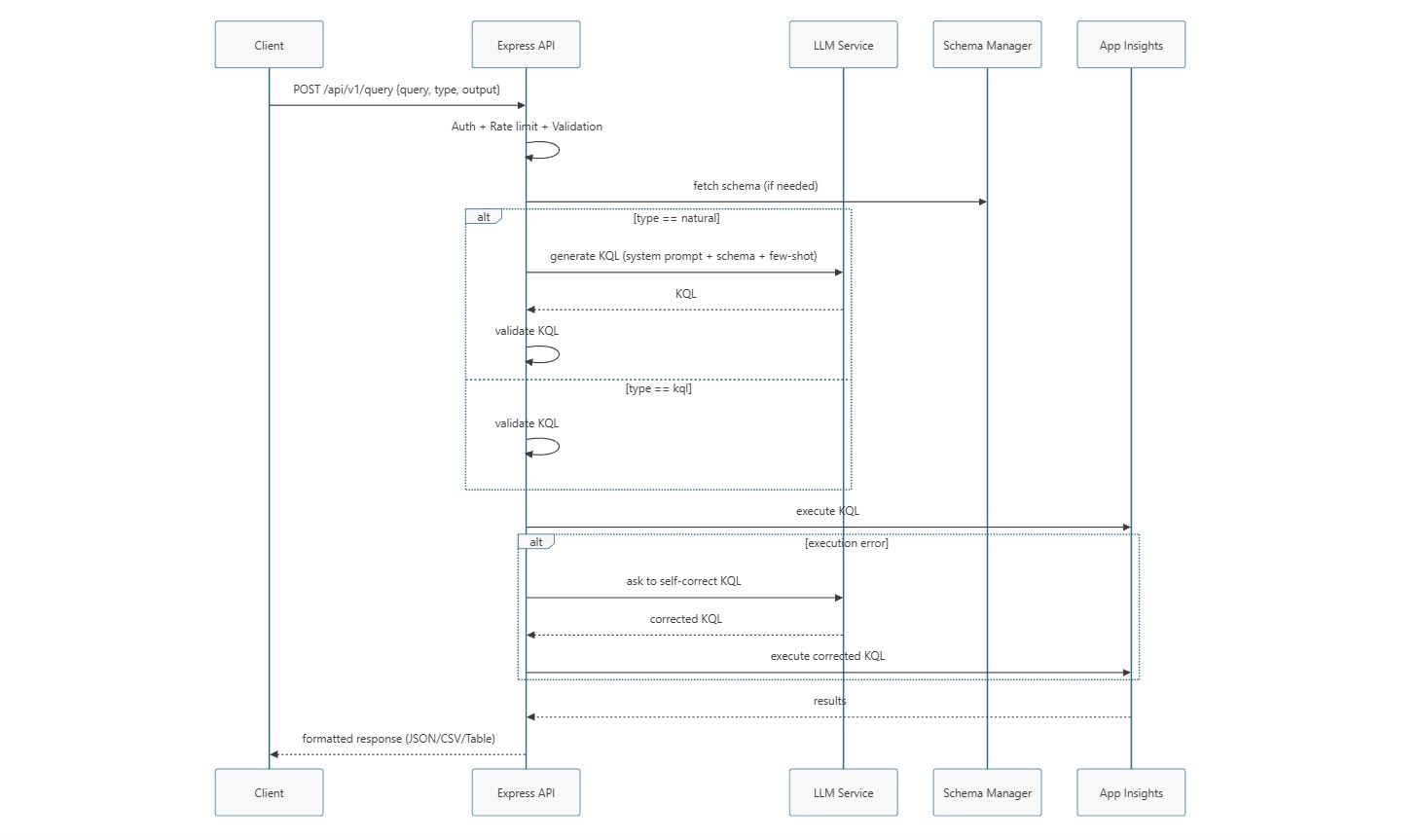
Sequence Diagram
Tech Stack
- Runtime: Node.js 18+ / Express
- LLM Clients: OpenAI SDK, Anthropic SDK, or OpenAI-compatible custom endpoints
- HTTP Client: Axios
- Caching: node-cache
- Logging: Winston
- Validation: express-validator
- Security & Rate-limiting: express-rate-limit, API-key middleware
- Formatting: csv-stringify, table
Installation & Configuration
- Install dependencies and run:
git clone https://github.com/AMRITANKA/AI-Powered-KQLExecutionService.git
cd AI-Powered-KQLExecutionService
npm install
- Copy
.env.exampleto.envand set credentials (or use environment variables):
# Azure Application Insights
APPINSIGHTS_APP_ID=your-app-id
APPINSIGHTS_API_KEY=your-api-key
APPINSIGHTS_API_URL=https://api.applicationinsights.io

# LLM API Key
LLM_API_KEY=your-llm-api-key

# API Key for service access
API_KEY=your-secure-api-key
-
Edit
config.yamlto tune LLM provider, model, temp, schema cache TTL, and ports. -
Start the server:
npm start
Server defaults to http://localhost:3000.
How It Works — Detailed Workflow
- Client posts to
/api/v1/querywith payload:{ query, type: "natural"|"kql", output?: "json"|"csv"|"table" }. - Global middleware:
helmet,cors, body parsers, request ID, logging, and global rate limiter. authenticatemiddleware validatesx-api-keywith timing-safe comparison.- If
type === "natural":- Infer candidate table from natural language (heuristic + available tables)
- Fetch schema context from Schema Manager (cached via
node-cache) - Build system prompt + dynamic few-shot examples derived from the schema
- Call configured LLM to generate KQL (response cleaned to plain KQL)
- Run local validation (
validator) against syntax and schema
- If
type === "kql", the query is validated (and optionally repaired) before execution. - Execute KQL against Azure Application Insights via the API client; transform tables->rows.
- On execution failure, optionally perform a limited LLM-assisted self-correction and retry.
- Format results to JSON/CSV/Table and return metadata:
executionTime,rowCount,generatedAt.
API Usage Examples
Natural Language (JSON)
curl --location 'http://localhost:3000/api/v1/query' \
  --header 'x-api-key: your-secure-api-key' \
  --header 'Content-Type: application/json' \
  --data '{
    "query": "Show me recent API requests",
    "type": "natural",
    "output": "json"
  }'
Raw KQL (CSV)
curl --location 'http://localhost:3000/api/v1/query' \
  --header 'x-api-key: your-secure-api-key' \
  --header 'Content-Type: application/json' \
  --data '{
    "query": "traces | where severityLevel >= 3 | take 50",
    "type": "kql",
    "output": "csv"
  }'
API Reference (summary)
- POST
/api/v1/query— Execute natural language or raw KQL - POST
/api/v1/validate— Validate KQL without executing - GET
/api/v1/schema/:table— Return schema for the named table - GET
/api/v1/schema— List cached schemas - POST
/api/v1/schema/refresh— Refresh the schema cache - GET
/health— Health check
Security & Operational Notes
- Authentication: API-key via
x-api-key. Keys are required unless optionalAuth path is used for health checks. - Rate limiting: global limiter and per-query stricter limiter to protect LLM and App Insights usage.
- Prompt guardrails: System prompt enforces timestamp requirements,
projectusage, joins only onoperation_Id, and other cost/efficiency rules. - LLM responses are cleaned to remove markdown and preamble; only plain KQL is executed.
- Schema caching reduces API calls and provides accurate context to the LLM for better KQL generation.
Design Notes & Rationale
- Use a low temperature by default to favor deterministic KQL generation and fewer hallucinations.
- Provide dynamic few-shot examples based on real schema to improve accuracy and reduce invalid column usage.
- Validate KQL locally to detect obvious errors before executing against App Insights.
- Provide LLM-assisted remediation for transient execution errors (limited retries only).
Project Structure (quick)
src/— application codeconfig.js,server.js,index.jsroutes/—query.js,schema.js,health.jsservices/—llm.js,appInsights.js,schemaManager.js,validator.jsmiddleware/—auth.js,rateLimiter.js,logger.js,errorHandler.jsutils/—formatters.js
config.yaml— configuration.env.example— sample environment variables
Troubleshooting & Observability
- Logs:
logs/combined.logandlogs/error.log(Winston). Adjustconfig.yamllogging level. - LLM health:
llmService.healthCheck()(used internally) — check API keys and provider configuration. - App Insights health:
appInsightsService.healthCheck()— ensures App Insights credentials and access.
Source Code
The full source code is available on GitHub: github.com/amritanka/AI-Powered-KQLExecutionService
Feel free to fork it, open issues, or submit pull requests. If you build something cool with it, I'd love to hear about it!