
Spring AI RAG Chat Application with Ollama and PGVector
A reference implementation of Retrieval Augmented Generation (RAG) built with Spring AI, locally hosted LLMs via Ollama, and PostgreSQL + pgvector for vector storage — a fully local, no-cloud-API-keys personal assistant for Spring Boot.
A reference implementation of Retrieval Augmented Generation (RAG) built with Spring AI, Ollama (locally hosted LLMs), and PostgreSQL + pgvector (vector storage). The application acts as a personal assistant that answers questions about Spring Boot by grounding its responses in the Spring Boot Reference PDF that ships in the repository.
When a question is asked, the app:
- Embeds the question using a local embedding model (
nomic-embed-text). - Performs a similarity search over vectorized chunks of the Spring Boot reference PDF stored in pgvector.
- Sends the most relevant chunks together with the question to a local chat model (
gemma2:2b) using Spring AI'sQuestionAnswerAdvisor. - Returns a concise, Spring-Boot-focused answer generated by the model.
Features
- End-to-end RAG pipeline with Spring AI's
ChatClientandQuestionAnswerAdvisor. - Local LLM inference via Ollama — no cloud API keys required.
- Persistent vector storage with PostgreSQL + the
pgvectorextension. - Automatic document ingestion on startup — the bundled Spring Boot reference PDF is read with Apache Tika, split into token-sized chunks, embedded, and stored in pgvector.
- Auto vector-schema initialization — the
vector_storetable is created automatically the first time the app boots (spring.ai.vectorstore.pgvector.initialize-schema=true). - Lazy model pulling — if
gemma2:2bornomic-embed-textare not present locally, Spring AI pulls them on first use. - REST API exposed at
POST /api/chatthat accepts a plain-text question and returns a model-generated answer. - Testcontainers-based integration tests for both PostgreSQL and Ollama.
Architecture
High-level RAG flow
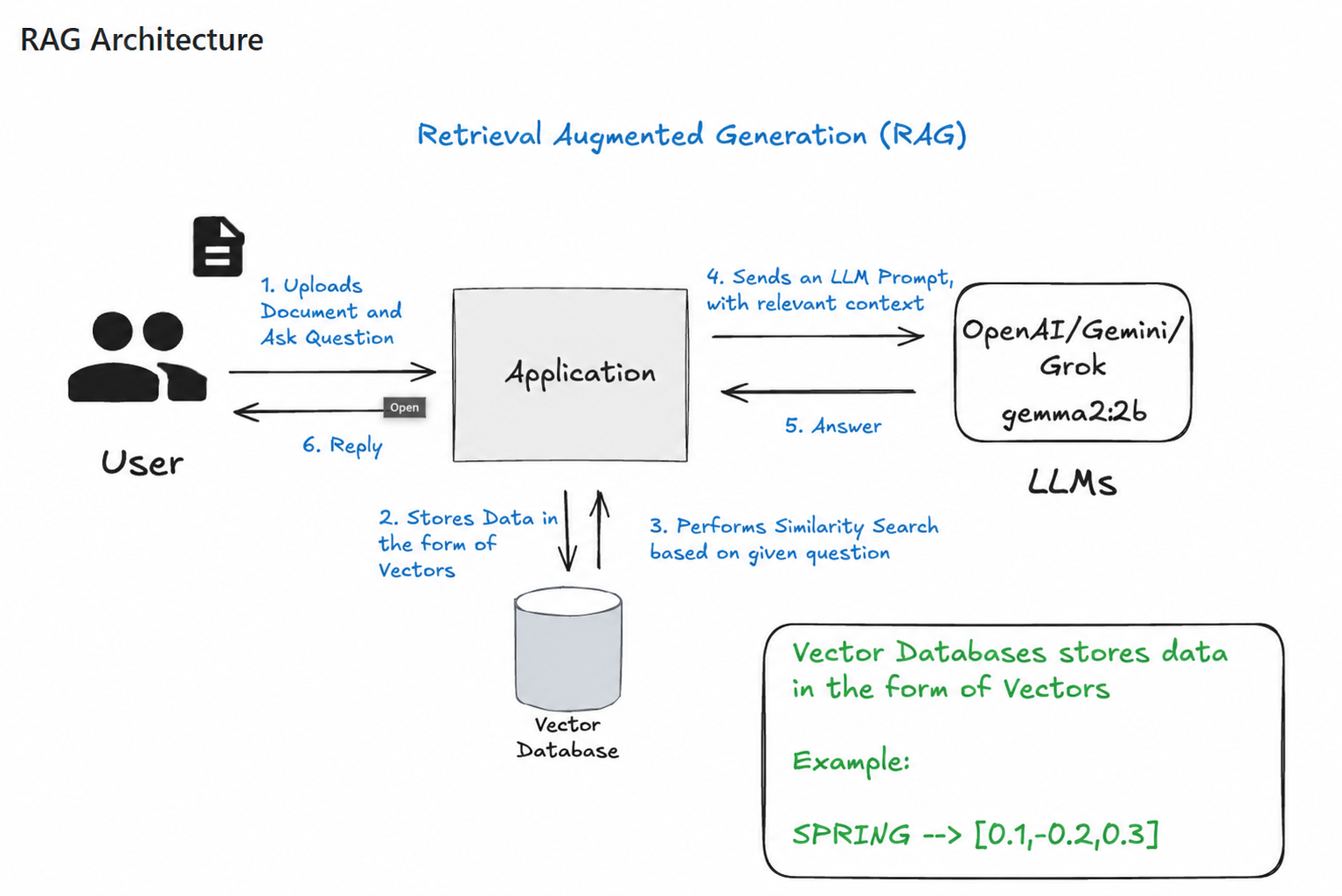
Client (curl / Postman)
        │
        ▼
┌────────────────────┐         ┌────────────────────┐
│  ChatController    │ ◀─────  │  OllamaChatModel   │
│  /api/chat         │         │  (gemma2:2b)       │
└─────────┬──────────┘         └────────────────────┘
          │ uses
          ▼
   ChatClient + QuestionAnswerAdvisor
          │
          ▼
┌────────────────────┐         ┌────────────────────┐
│   VectorStore      │ ◀─────  │  Ollama Embeddings │
│   (pgvector)       │         │  (nomic-embed-text)│
└────────────────────┘         └────────────────────┘
Document ingestion pipeline (runs once on startup)
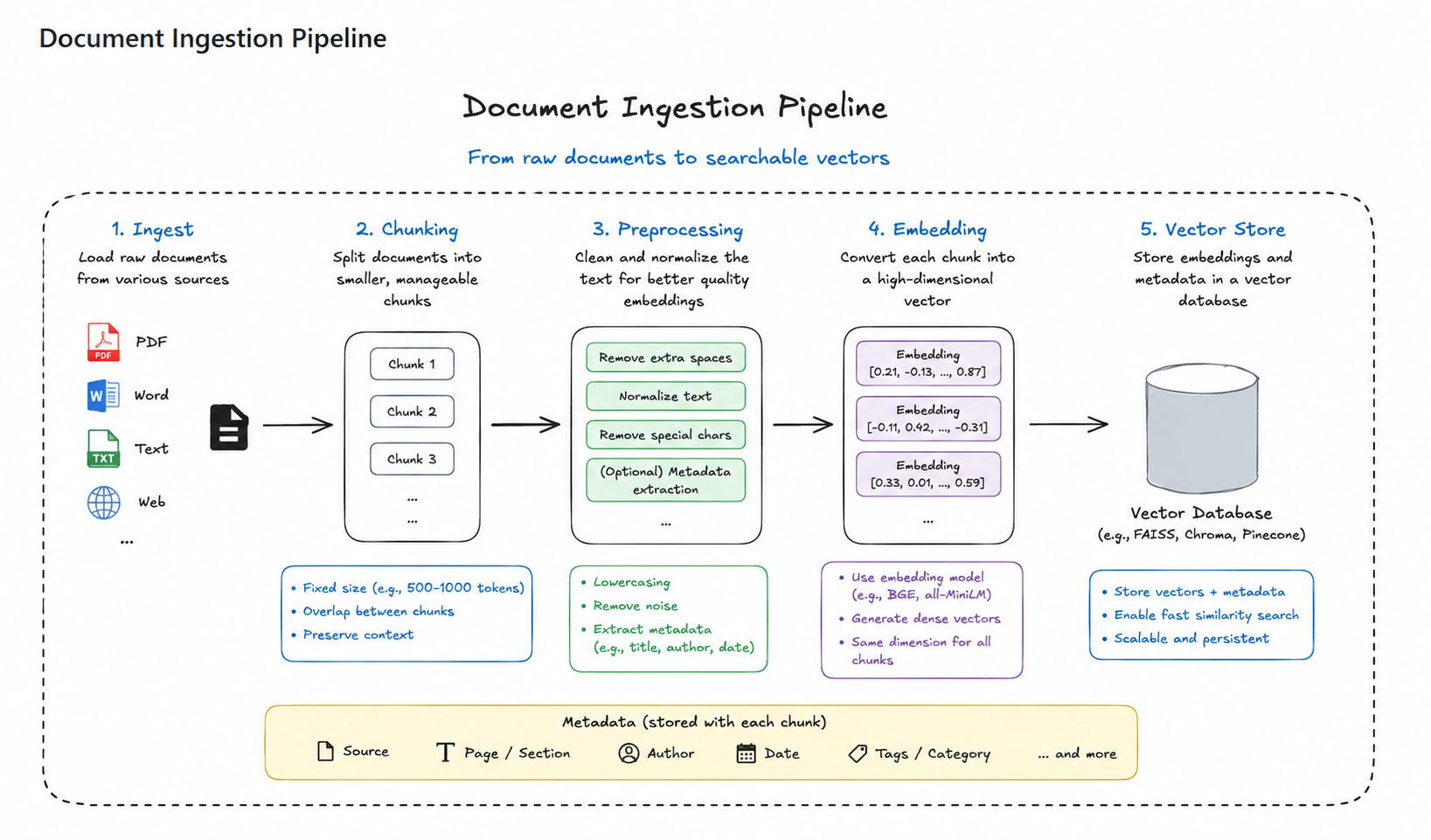
classpath:/pdf/spring-boot-reference.pdf
        │
        ▼  TikaDocumentReader
   raw text
        │
        ▼  TokenTextSplitter
   chunks (~800 tokens, ~50 overlap)
        │
        ▼  OllamaEmbeddingModel (nomic-embed-text)
   float[] vectors
        │
        ▼  VectorStore.accept(...)
   PostgreSQL: vector_store table
The ingestion is implemented by DocumentIngestionService, which is a CommandLineRunner — Spring Boot invokes run(...) automatically after the context is fully initialized.
Tech Stack
| Layer | Technology |
|---|---|
| Language | Java 17 |
| Framework | Spring Boot 3.4.3 |
| AI Framework | Spring AI 1.0.0-M6 |
| Chat Model | Ollama — gemma2:2b |
| Embeddings | Ollama — nomic-embed-text |
| Vector DB | PostgreSQL 16 with the pgvector extension |
| PDF Parsing | Apache Tika (spring-ai-tika-document-reader) |
| Build | Maven (with the Maven Wrapper mvnw / mvnw.cmd) |
| Tests | JUnit 5, Testcontainers (PostgreSQL + Ollama) |
| Containers | Docker / Docker Compose |
Project Structure
.
├── compose.yml                                          # docker-compose definition for pgvector
├── pom.xml                                              # Maven build, dependencies, Spring AI BOM
├── mvnw / mvnw.cmd / .mvn/                              # Maven Wrapper (no system Maven needed)
├── screenshots/                                         # Images embedded in this README
│   ├── rag_architecture.png
│   ├── document_ingestion_pipeline.png
│   └── postman.jpg
├── volume-data/postgres/                                # Persisted pgvector data (mounted into the container)
└── src/
    ├── main/
    │   ├── java/com/apal/springai/rag/
    │   │   ├── SpringAiRagTutorialApplication.java     # @SpringBootApplication entry point
    │   │   ├── ChatController.java                      # REST controller — POST /api/chat
    │   │   └── ingestion/
    │   │       └── DocumentIngestionService.java        # CommandLineRunner: PDF → chunks → vectors
    │   └── resources/
    │       ├── application.properties                   # Ollama, datasource, vector store config
    │       └── pdf/
    │           └── spring-boot-reference.pdf            # The document being indexed
    └── test/
        └── java/com/apal/springai/rag/
            ├── SpringAiRagTutorialApplicationTests.java
            ├── TestSpringAiRagTutorialApplication.java
            └── TestcontainersConfiguration.java         # Spins up PG + Ollama via Testcontainers
Key code walkthrough
SpringAiRagTutorialApplication.java— minimal Spring Boot entry point. The@SpringBootApplicationannotation enables component scanning, auto-configuration, and configuration properties.ChatController.java— exposes a singlePOST /api/chatendpoint that:- Builds a
ChatClientaround the injectedOllamaChatModel. - Sets a
SYSTEM_PROMPTinstructing the model to act as a Spring Boot expert and refuse off-topic questions. - Wires in a
QuestionAnswerAdvisorbacked by the pgvectorVectorStore, which performs the retrieval-augmentation automatically. - Accepts the user message as a raw
Stringrequest body (Content-Type:text/plain).
- Builds a
DocumentIngestionService.java— aCommandLineRunnerthat runs once at startup. It:- Reads
classpath:/pdf/spring-boot-reference.pdfviaTikaDocumentReader. - Splits the text into chunks using
TokenTextSplitter(Spring AI's default token-aware splitter). - Calls
vectorStore.accept(...), which internally embeds each chunk and persists it to thevector_storetable in PostgreSQL.
- Reads
Prerequisites
Make sure the following are installed and reachable on your machine before building:
- Java 17 or newer (the project targets
java.version=17; any JDK 17+ LTS works).java -version - Docker Desktop (or the Docker Engine on Linux) with the
dockeranddocker compose(or legacydocker-compose) CLIs.docker --version docker compose version - Ollama, installed and running. Download: https://ollama.ai/download.
ollama --version curl http://localhost:11434 # should respond with "Ollama is running" - Maven is technically not required — the repository ships a Maven Wrapper (
./mvnwon Linux/macOS,mvnw.cmdon Windows). Use it directly.
ℹ️ The first run will take a few minutes while Spring AI pulls
gemma2:2bandnomic-embed-textfrom the Ollama registry and ingests the PDF. Subsequent runs reuse the cached models and existing vectors.
Setup Instructions
Follow these steps the first time you clone the project. Steps 1–3 only need to be done once per machine.
1. Install and start Ollama
- macOS / Windows: install the desktop app, or
brew install ollama/winget install Ollama.Ollama. - Linux:
curl -fsSL https://ollama.ai/install.sh | sh - Make sure the Ollama daemon is running. On macOS/Windows the app handles this; on Linux run:
ollama serve - The default base URL is
http://localhost:11434, which matchesapplication.properties.
2. (Optional) Pre-pull the models
ollama pull gemma2:2b
ollama pull nomic-embed-text
If you skip this, the application will pull the models on first request, gated by
spring.ai.ollama.init.pull-model-strategy=when_missingand a 5-minute timeout (spring.ai.ollama.init.timeout=5m). On slow networks this can exceed the timeout — pre-pulling is recommended.
3. Start the pgvector database
From the project root:
docker compose up -d            # modern Docker
# or, on older installs:
docker-compose up -d
This launches a single pgvector service:
- Image:
pgvector/pgvector:pg16 - Container name:
pgvector - Port:
5432(host) →5432(container) - Database:
vectordb - User / Password:
postgres/postgres - Persistent volume:
./volume-data/postgres(mounted to/var/lib/postgresql/data)
Verify the container is healthy:
docker ps                       # should list "pgvector" with status "Up"
docker logs pgvector --tail 5   # should end with "database system is ready to accept connections"
Spring Boot also ships with
spring-boot-docker-composeas a runtime dependency. Ifspring.docker.compose.enabled=true(the default), Spring will attempt to start the compose stack automatically when the app boots and the containers are not already running. The explicitdocker compose up -dabove is the manual equivalent and recommended for first-time setup so you can see the logs.
4. Build the application
Use the Maven Wrapper so you don't need a system-wide Maven install:
# Linux / macOS / Git Bash
./mvnw clean install

# Windows PowerShell / CMD
.\mvnw.cmd clean install
(If you have Maven installed globally, mvn clean install works too.)
Running the Application
Start the app with the Spring Boot Maven plugin:
# Linux / macOS / Git Bash
./mvnw spring-boot:run

# Windows PowerShell / CMD
.\mvnw.cmd spring-boot:run
On startup you will see logs similar to:
Started SpringAiRagTutorialApplication in 3.42 seconds
Ingesting PDF file
Completed Ingesting PDF file
Tomcat started on port 8080
The REST API is now available at http://localhost:8080.
Usage
Send a plain-text question to the chat endpoint:
curl --location 'http://localhost:8080/api/chat' \
     --header 'Content-Type: text/plain' \
     --data ' "Why Spring Was Created"'
Expected response (paraphrased by the model):
Spring was created to address the complexity of enterprise Java development...
Postman reference
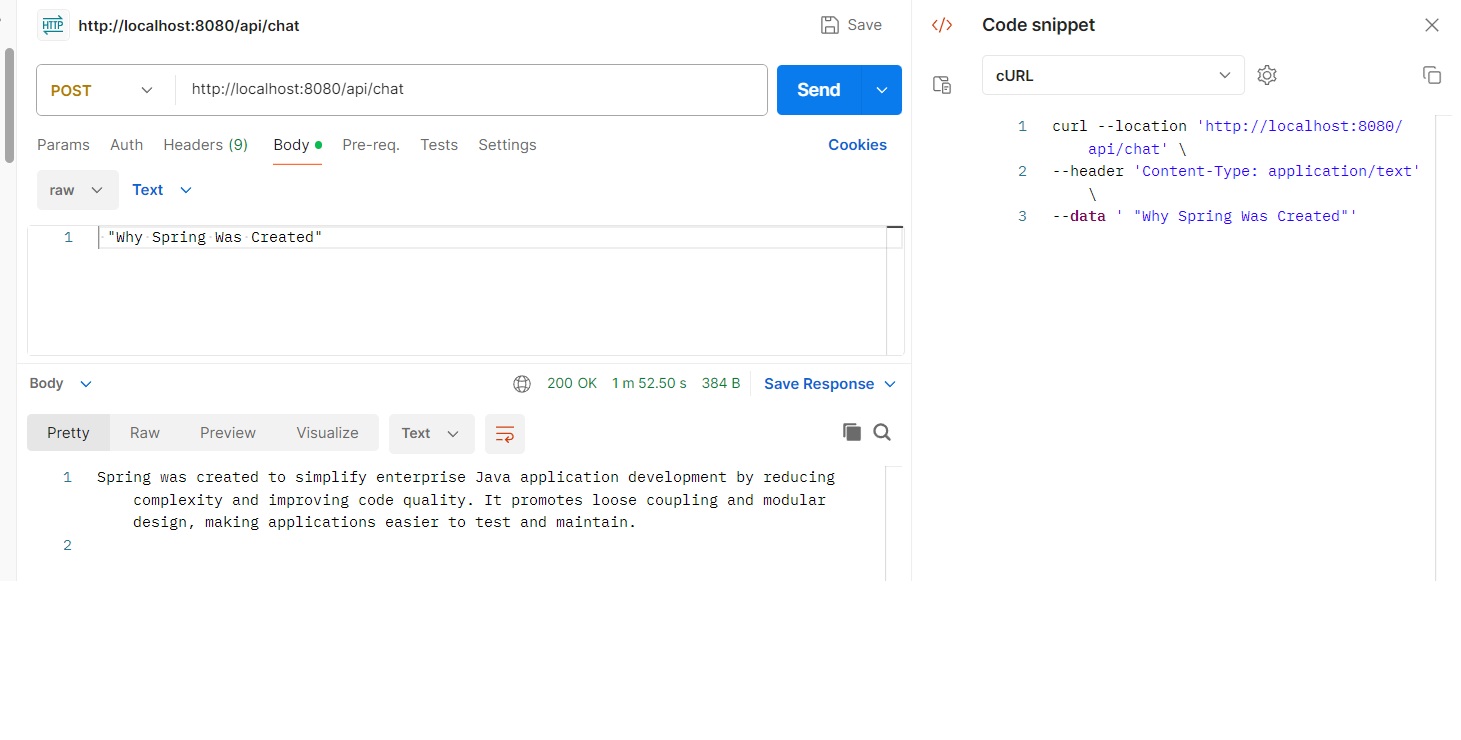
If you prefer Postman:
- Method:
POST - URL:
http://localhost:8080/api/chat - Headers:
Content-Type: text/plain - Body: raw text — e.g.
What is Spring Boot?
Sample questions to try
Why was Spring Framework originally created?What is the difference between Spring and Spring Boot?How do I configure an embedded Tomcat server?What are Spring Boot starters?How does auto-configuration work?
Anything outside Spring Boot will be refused politely, e.g.:
Please ask me a Spring Boot related question.
Configuration Reference
All runtime configuration lives in src/main/resources/application.properties. Defaults are designed to work out-of-the-box for local development.
| Property | Default | Purpose |
|---|---|---|
spring.application.name |
spring-ai-ollama-rag-chat |
Logical name of the application. |
spring.ai.ollama.base-url |
http://localhost:11434 |
Where the Ollama daemon is reachable. |
spring.ai.ollama.chat.options.model |
gemma2:2b |
Chat model used for Q&A. |
spring.ai.ollama.chat.options.temperature |
0.2 |
Low temperature → more deterministic, focused answers. |
spring.ai.ollama.embedding.options.model |
nomic-embed-text |
Embedding model used for both ingest and query. |
spring.ai.ollama.init.pull-model-strategy |
when_missing |
Auto-pull a model from the registry on first use if not present. |
spring.ai.ollama.init.timeout |
5m |
How long Spring AI waits for a model pull/load. |
spring.ai.vectorstore.pgvector.initialize-schema |
true |
Auto-create the vector_store table on first run. |
spring.datasource.url |
jdbc:postgresql://localhost:5432/vectordb |
PostgreSQL connection string. |
spring.datasource.username / password |
postgres / postgres |
Matches the credentials set in compose.yml. |
logging.level.org.springframework.ai.vectorstore |
DEBUG |
Verbose logging of vector store operations. |
Changing the chat or embedding model
- Pull the model locally:
ollama pull <model-name>. - Update
application.properties:
Make sure the embedding model's output dimension is compatible with thespring.ai.ollama.chat.options.model=<model-name> spring.ai.ollama.embedding.options.model=<embedding-model>pgvectorcolumn width (default 1536). If not, adjust the column or use a matching model.
Testing
The test classpath uses Testcontainers to spin up a real PostgreSQL (with pgvector) and a real Ollama instance per test run — no mocks.
TestcontainersConfiguration declares:
OllamaContainerfromollama/ollama:latest, registered with@ServiceConnectionso Spring auto-wires host/port.PostgreSQLContainerfrompgvector/pgvector:pg16, also registered with@ServiceConnection.
Run all tests with:
./mvnw test
Test runs require Docker to be available. They download the
pgvector/pgvector:pg16andollama/ollama:latestimages on first run, which can be slow.
Troubleshooting
1. Role "postgres" does not exist / password authentication failed for user "postgres"
The persisted volume in volume-data/postgres is in an inconsistent state (often because the directory was created before POSTGRES_PASSWORD was set, or copied from a different environment). The DB started, but the configured role is missing.
Fix — reset the volume (this wipes stored vectors, which the app will rebuild on next startup):
docker compose down
rm -rf volume-data/postgres
docker compose up -d
Non-destructive fix — create the role manually inside the container:
docker exec -it -u postgres pgvector psql
CREATE ROLE postgres WITH LOGIN SUPERUSER PASSWORD 'postgres';
\q
2. Connection refused to localhost:11434
Ollama is not running. Start it:
- macOS / Windows: open the Ollama app.
- Linux:
ollama servein a terminal.
Verify: curl http://localhost:11434 should return Ollama is running.
3. Connection refused to localhost:5432
The pgvector container is not running. Start it with docker compose up -d and confirm with docker ps.
4. mvn is not recognized (Windows)
Use the wrapper: .\mvnw.cmd spring-boot:run. You don't need a system Maven install.
5. Slow first request / timeouts pulling models
Pre-pull the models:
ollama pull gemma2:2b
ollama pull nomic-embed-text
You can also raise spring.ai.ollama.init.timeout in application.properties.
6. Web server failed to start. Port 8080 was already in use
Another process is bound to 8080. Either stop it, or add to application.properties:
server.port=8081
7. Stale ingestion / want to re-index the PDF
The vector store is persisted in the vector_store table. To re-ingest, drop it:
docker exec -it pgvector psql -U postgres -d vectordb -c "DROP TABLE IF EXISTS vector_store;"
Then restart the app.
Key Dependencies
Declared in pom.xml:
spring-boot-starter-web— REST controllers, embedded Tomcat.spring-ai-ollama-spring-boot-starter— Ollama chat + embedding model auto-configuration.spring-ai-pgvector-store-spring-boot-starter— pgvectorVectorStoreauto-configuration.spring-boot-docker-compose(runtime, optional) — auto-startscompose.ymlservices when the app boots.spring-ai-tika-document-reader— Apache Tika-based PDF/Document readers used by the ingestion service.- Test scope:
spring-boot-starter-testspring-boot-testcontainersspring-ai-spring-boot-testcontainersorg.testcontainers:junit-jupiterorg.testcontainers:ollamaorg.testcontainers:postgresql
- Build plugins:
spring-boot-maven-plugin
- Spring AI BOM:
1.0.0-M6(imported viadependencyManagement).
🧭 Roadmap & Contributing
Planned enhancements for this project:
- 🔐 Authentication — protect
POST /api/chatwith Spring Security + a simple API key or JWT flow. - 💬 Chat history — persist conversations in PostgreSQL so users can resume prior sessions.
- 📚 Multi-document ingestion — index multiple PDFs / Markdown / HTML sources, not just the bundled reference.
- 🔄 Re-indexing endpoint —
POST /api/admin/reindexto refresh the vector store on demand (instead of dropping the table manually). - 🌐 Configurable LLM provider — switch the chat and embedding models from
application.properties(or via a/api/modelsendpoint), supporting other Ollama models and remote providers (OpenAI, Azure OpenAI, etc.). - 📊 Observability — Micrometer + Prometheus metrics for retrieval latency, token usage, and embedding call counts.
- 🧪 Stronger evaluation — an integration test suite that asserts retrieval quality on a small golden Q&A set.
- 🐳 Production deployment guide — Dockerfile, multi-stage build, and a sample
docker-compose.ymlthat also runs the Spring Boot app alongside pgvector. - 🌐 i18n — localized system prompts (English / Spanish / Hindi) so the assistant can answer in the user's language.
- ✅ End-to-end tests with Playwright for the REST API surface.
Contributions are welcome. Fork → feature branch → PR against main. Please keep PRs focused, run ./mvnw verify before opening the PR, and add tests for any new behavior.
Repository: github.com/AMRITANKA/SpringAI-RAG-Chat-Application-with-Ollama-and-PGVector